
Activating your license
Your license key connects your site to wccurrencyswitch.com so WordPress can install new versions of WC Currency Switch for you, just like plugins from WordPress.org. Each license covers a set number of sites. For example, an agency on the 25 Sites plan can activate the same key on 25 client stores, and move a slot from one store to another when a project ends.
How it works#
Licensing runs through SureCart, the service that sells the plugin on wccurrencyswitch.com. When you activate your key, SureCart records an activation for this site and counts it against your plan. From then on, WordPress shows new versions of the plugin on the Dashboard > Updates and Plugins screens.
The license is used for updates. In version 1.0.0 the plugin’s store features, such as currencies, rates and the switcher, do not check whether a license is active.
Plans#
| Plan | Sites | Price |
|---|---|---|
| 5 Sites | 5 | $49.99 a year |
| 25 Sites | 25 | $99.99 a year |
| Unlimited | No limit | $199.99 a year |
| Lifetime | 1,000 | $499.99 once |
The yearly plans are billed annually. Lifetime is a one-time payment.
Activate your license#
- Log in to your account at wccurrencyswitch.com and copy your license key.
- In WordPress, go to WooCommerce > Currency Switch > License.
- Paste the key into the License Key field. The field hides what you type.
- Click Activate License (or press Enter). The button shows Activating… while it works.
- When it succeeds you see This site was successfully activated. and the tab reloads.
After activation the tab shows your plan name (for example 25 Sites), the status Active, and how many sites are activated, for example “3 of 25 sites activated”. Under Your plan, the card for your plan is marked Your plan. The badge in the page header changes to License active.
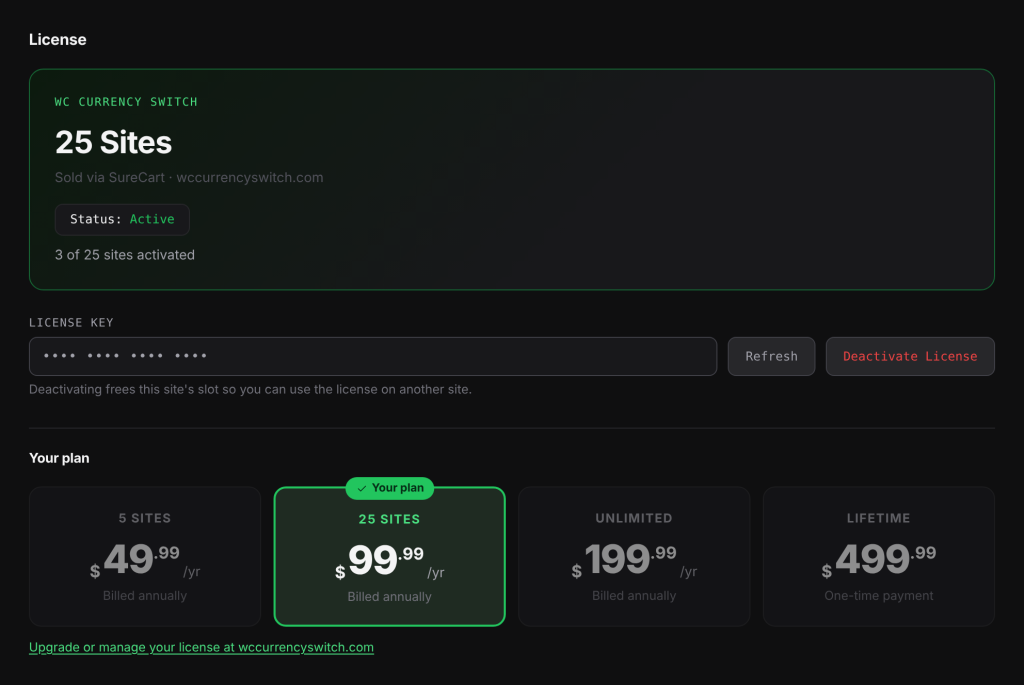
For safety, the tab never shows your full key again. It shows only the last four characters, with the rest hidden.
What the License tab shows#
| Status | What it means |
|---|---|
| Not activated | No license is activated on this site yet. |
| Active | SureCart confirmed the activation for this site. |
| Active (not verified) | SureCart could not be reached just now. Your key is kept and nothing stops working. The tab tries again on the next page load. |
| Activation removed | The activation for this site no longer exists at SureCart. Click Activate License again to reconnect it. The saved key is used if you leave the field blank. |
| Revoked | The license is no longer valid. You need a new license. |
The plan and site count are stored for up to 12 hours. Click Refresh to check with SureCart straight away, for example right after you upgrade your plan.
If activation fails#
The message under the key field says why:
- This is not a valid license. Please double-check it and try again. Check the key for typos or extra spaces, and copy it again from your account.
- This license is not valid for this product. The key belongs to a different product.
- This license has been revoked. Please re-purchase to obtain a new license. Buy a new license at wccurrencyswitch.com.
- If all the sites on your plan are already used, SureCart refuses the activation and the tab shows SureCart’s message. Deactivate the license on a site you no longer use, or upgrade your plan.
- Could not reach your site. Please try again. The request from your browser to your own site failed. Reload the page and try again.
If an activation fails partway, the plugin undoes it so you do not lose a slot, and your previously saved key is kept.
Move your license to another site#
- On the old site, go to WooCommerce > Currency Switch > License.
- Click Deactivate License. You see This site was successfully deactivated. This frees the slot.
- On the new site, activate the key as described above.
Good to know#
http://,https://,www.and non-www.versions of the same address count as one site.- A site at a different domain, subfolder or port counts as a separate site. A staging copy at its own address therefore uses its own slot.
- Deactivating or deleting the plugin does not free the slot. Click Deactivate License first.
- If you delete the plugin with Remove all data when the plugin is deleted turned on, the saved key is removed from the site, but the activation still counts against your plan. Click Deactivate License before you delete.
- The links at the bottom of the tab take you to wccurrencyswitch.com to buy, upgrade or manage your license.
Related docs#
- Installing WC Currency Switch
- Updating the plugin
- Uninstalling: what is kept and what is removed
- Tour of the settings page