
Currency by language (Polylang and TranslatePress)
If your store is translated with Polylang or TranslatePress, you can give each language its own currency. For example, French pages show prices in EUR, Arabic pages in KWD and English pages in USD. A shopper who switches the site to French sees euro prices straight away, with no extra click. Both translation plugins also work with WC Currency Switch without any setup if you do not want currency by language.
How it works#
A language rule links a language to a currency. On each page, the plugin checks the page’s language and, if there is a rule for it, shows that currency.
When several things could decide the currency, the plugin uses this order:
- A currency the visitor picked in the switcher or a currency menu. It is saved in the currency cookie and always wins.
- The language rule for the page’s language.
- Geo detection from the visitor’s country.
- Your default currency.
A language rule does not set the currency cookie. The page’s language decides the currency again on every page, so when the visitor changes language, the currency changes with it.
On a page whose language has a rule, geo detection does not run. That way, geo detection cannot save a cookie that would then override your language rules on later pages.
Set it up#
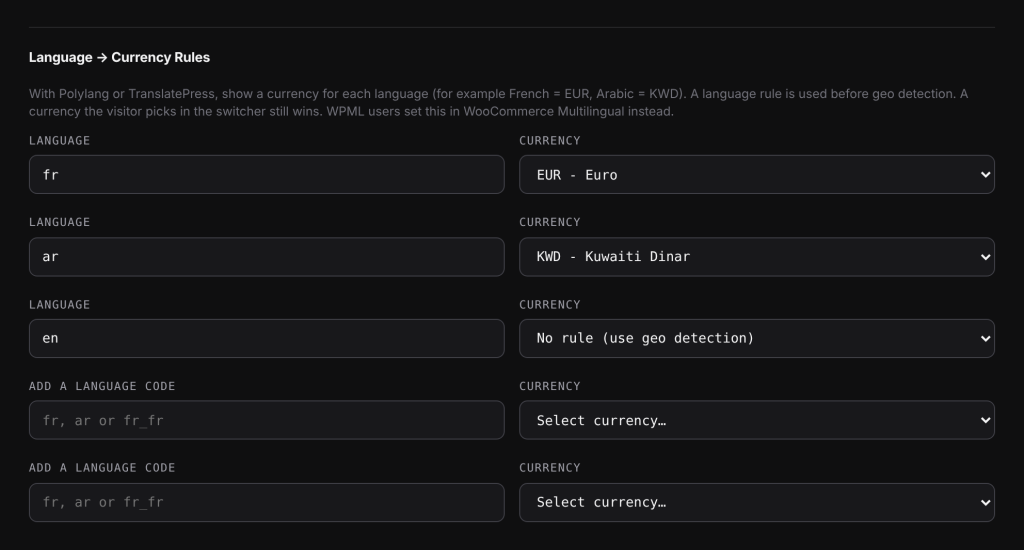
- Go to WooCommerce > Currency Switch > Location Rules.
- Scroll to Language → Currency Rules. Each language from Polylang or TranslatePress has a row, with its code in Language.
- In Currency, pick a currency for that language. Leave No rule (use geo detection) for languages that should keep using geo detection.
- To add a language that is not listed, type its code in Add a language code, for example
fr,arorfr_fr, and pick a Currency next to it. There are two empty rows for this. - Click Save Changes.
To remove a rule, set its Currency back to No rule (use geo detection) and save.
The Currency list only shows currencies enabled on the Currencies tab. Enable a currency there first if it is missing.
Language codes#
- Polylang: the rule uses the language slug, such as
frorar. Polylang’s languages are listed for you. - TranslatePress: TranslatePress uses full locales, such as
fr_FR. Its languages are listed in lower case, such asfr_fr. A rule can use the full locale (fr_fr) or just the language part (fr). The full locale is checked first, then the language part.
Using just the language part is handy when one currency covers several locales. For example, one rule fr to EUR covers both fr_FR and fr_BE.
Examples#
Three languages. Your store sells in USD and has EUR and KWD enabled. You add these rules: fr to EUR, ar to KWD, and No rule (use geo detection) for en.
- A visitor opens a French page: prices show in EUR.
- They switch to Arabic: prices show in KWD.
- They switch to English: geo detection picks a currency from their country.
The visitor picks a currency. On a French page, the visitor picks USD in the switcher. USD is saved in the cookie. From now on every page shows USD, in every language, until the cookie expires (30 days by default) or they pick another currency.
TranslatePress with regional locales. Your site has fr_FR and fr_CA. You add fr_ca to CAD and fr to EUR. Canadian French pages show CAD, because the full locale is checked first. French pages from France show EUR.
Good to know#
- If Polylang or TranslatePress is not active and you have no rules, the section says “Polylang or TranslatePress is not active, so language rules have no effect.”
- Language rules do not work with WPML. WPML users set currency by language in WooCommerce Multilingual instead.
- On a page in a language with no rule, geo detection runs as usual and can save a currency cookie. That cookie then wins over language rules on later pages. If you want every language to decide the currency, give every language a rule.
- A language rule only applies if its currency is enabled. If you later disable that currency, the rule is skipped.
Related docs#
- WPML and WooCommerce Multilingual
- Location Rules: pick the currency for a country
- How first-visit currency detection works
- Setting the default currency