
How converted prices are worked out
You enter every product price once, in your store currency. When a shopper picks another currency, the plugin works out the price for them on the fly, using the exchange rate and the rules you set for that currency. Knowing the order of these steps lets you predict exactly what a shopper will see: for example, why a $49.00 product shows as €45.99 to a shopper in Germany.
How it works#
Each converted price goes through three steps, always in this order:
- Exchange rate. Store price × the live exchange rate, or × your fixed exchange rate if you set one.
- Conversion fee. The result is increased by the Conversion Fee %, if any.
- Rounding. The result is rounded to your Rounding Target (such as .99) using your Rounding Type, if any.
The shopper then sees the result in that currency’s number format: its decimal places, separators and symbol.
Two things skip all three steps:
- Your store currency. Prices in the store currency (also called the base currency) are shown exactly as entered.
- Fixed product prices. If you set a fixed price for a product in a currency, that price is charged exactly as entered, with no rate, fee or rounding.
Set it up#
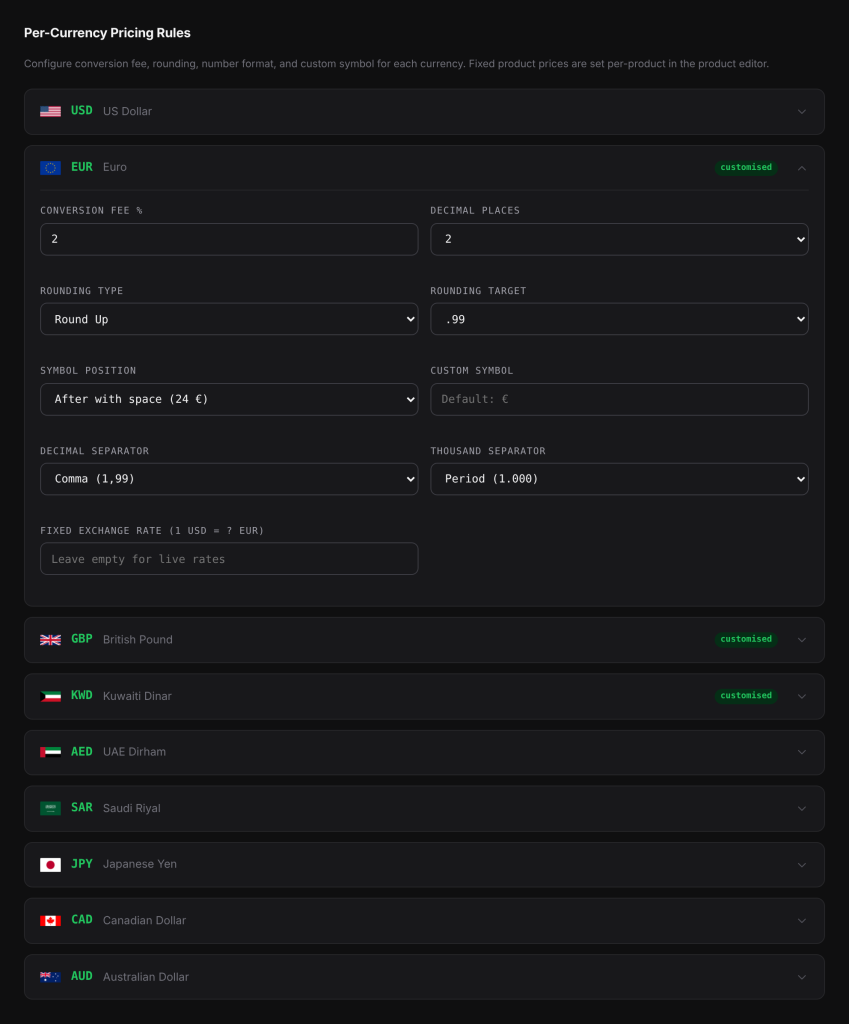
- Go to WooCommerce > Currency Switch > Pricing.
- Click a currency to expand its panel.
- Set Conversion Fee %, Rounding Type and Rounding Target, and optionally a Fixed Exchange Rate.
- Click Save Changes.
A currency with a fee, rounding, fixed rate or custom symbol shows a customised badge in the list.
Examples#
A full worked example#
Your store currency is USD. A product costs $49.00. The live rate is 1 USD = 0.92 EUR. For EUR you set a Conversion Fee % of 2, Rounding Type Round Up and Rounding Target .99.
- Exchange rate: 49.00 × 0.92 = 45.08
- Conversion fee: 45.08 × 1.02 = 45.9816
- Rounding: the next price ending in .99 at or above 45.9816 is 45.99
The shopper sees €45.99.
A sale price on the same product goes through the same steps on its own. A $39.00 sale price becomes 39.00 × 0.92 = 35.88, then 35.88 × 1.02 = 36.5976, then rounded up to €36.99.
No fee, no rounding, three decimals#
The live rate is 1 USD = 0.3087 KWD. KWD has no fee and no rounding, and uses 3 decimal places (the usual for Kuwaiti dinar).
- Exchange rate: 49.00 × 0.3087 = 15.1263
- No fee.
- No rounding.
The shopper sees KD15.126, because the number is shown with 3 decimal places.
A store whose currency is not USD#
Rates are stored against USD, so for other pairs the plugin divides one rate by the other. Your store currency is GBP, with 1 USD = 0.79 GBP and 1 USD = 0.92 EUR.
- EUR for 1 GBP: 0.92 ÷ 0.79 = 1.164557 (rounded here for reading)
- A £20.00 product: 20.00 × 1.164557 = 23.2911
- With Round to Nearest and target .00 (whole): 23.2911 is closer to 23.00 than to 24.00
The shopper sees €23.00.
Using a fixed exchange rate#
Same $49.00 product and EUR rules as the first example, but with a Fixed Exchange Rate of 0.90.
- 49.00 × 0.90 = 44.10
- 44.10 × 1.02 = 44.982
- Rounded up to .99: 44.99
The shopper sees €44.99.
What else is converted#
The same three steps are used for:
- Regular and sale prices, including variations and variable price ranges.
- Shipping costs.
- Fixed-amount coupons (for example “$10 off”). Percentage coupons need no conversion.
Spending limits, such as a free shipping minimum, coupon minimum and maximum spend, and the price filter range, use the exchange rate and fee but no price rounding. See Free shipping minimums, coupons and the price filter.
Good to know#
- When you edit products in the admin area, you always see the prices you entered in your store currency. Conversion happens for shoppers only.
- If there is no live rate for a currency and no fixed rate, prices in that currency are not converted. Check the Rate History on the Rate Provider tab.
- Instant switching (beta) uses the same rules. Prices for every currency are worked out on the server in advance, so a switch without a reload shows the same price as a page reload.
Related docs#
- Price rounding and conversion fees
- Fixed exchange rates
- Fixed prices for products and variations
- Number format and currency symbols