
Plugins that are not supported
Some WooCommerce plugins were reviewed for WC Currency Switch and no integration is available for them in version 1.0.0. This page lists them, so you know before launch which parts of your store may not follow the shopper’s currency. For example, if you sell gift cards with WooCommerce Gift Cards, check how gift card amounts look to a shopper browsing in EUR before you launch.
What “not supported” means#
The plugin has no code for these plugins. Anything they show through WooCommerce’s normal product price may still convert, like any other product. Any amounts they store and calculate on their own are not handled by WC Currency Switch, so those amounts can be wrong for a shopper in another currency.
The same list is on WooCommerce > Currency Switch > Integrations, at the bottom, under Checked: No Integration Available.
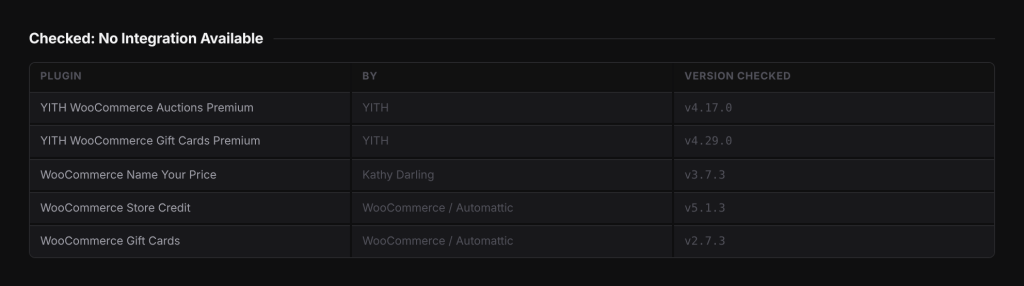
The list#
| Plugin | By | Version checked |
|---|---|---|
| YITH WooCommerce Auctions Premium | YITH | 4.17.0 |
| YITH WooCommerce Gift Cards Premium | YITH | 4.29.0 |
| WooCommerce Name Your Price | Kathy Darling | 3.7.3 |
| WooCommerce Store Credit | WooCommerce / Automattic | 5.1.3 |
| WooCommerce Gift Cards | WooCommerce / Automattic | 2.7.3 |
“Version checked” is the version that was reviewed. The list does not say anything about later versions.
If you use one of these plugins#
- Test on a staging site first. Enable a second currency, switch to it in a private browser window and go through every step that involves the plugin: the product page, the cart, the checkout, the order, and any email.
- Write down which amounts stay in your store currency. Your store currency is the currency set in WooCommerce, also called the “base currency”.
- Decide how to handle it. One option is to turn on Settle orders in base currency on WooCommerce > Currency Switch > General. The cart, checkout and order then run in your store currency, while shoppers still browse in theirs. This can help when the other plugin keeps its amounts in your store currency, but only your tests can confirm it.
- Test again with the setting you chose.
Looking for a customer-set price?#
The two “name your price” plugins are different products:
- YITH WooCommerce Name Your Price is supported. Its minimum, maximum and suggested prices convert, and the amount the shopper types is converted back to your store currency. See Subscriptions, bookings and memberships.
- WooCommerce Name Your Price by Kathy Darling is on the list above and is not supported.
Good to know#
- A plugin that is not on this list and not on the Integrations tab has not been reviewed. Prices it shows through WooCommerce’s normal price functions are converted like any product, but test any plugin that stores money amounts of its own.
- To ask for a plugin to be checked, contact support with the plugin name and version.
Related docs#
- Subscriptions, bookings and memberships
- Checkout currency options
- Product add-ons and options
- Frequently asked questions