
A payment method is missing at checkout
A shopper reaches checkout and a payment method you expected, such as PayPal or card payments, is not in the list. With several currencies this usually happens because the method is turned off for that currency, or because the payment provider itself does not take that currency. For example, a store might show PayPal to USD shoppers but not to KWD shoppers. Work through the checks below in order; each one says what to look at, where, and what to do.
How it works (in short)#
WooCommerce first decides which payment methods are available. WC Currency Switch then removes the ones you turned off for the currency the checkout is running in. The payment method’s own plugin can also hide itself for a currency it does not support. A method has to pass all three to appear.
Step-by-step diagnosis#
1. Check the method is enabled in WooCommerce#
- Check: the payment method is turned on.
- Where: WooCommerce > Settings > Payments.
- What to do: enable it. WC Currency Switch can only hide enabled methods; it never adds one.
2. Find out which currency the checkout is in#
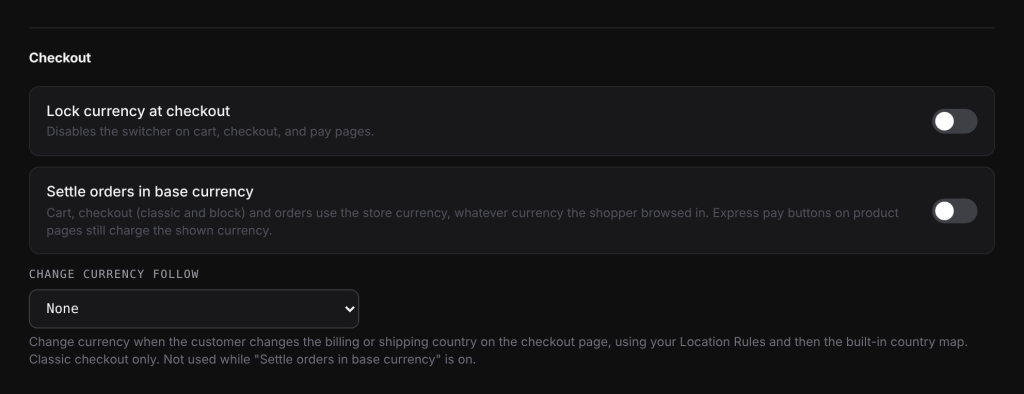
- Check: the currency shown on the checkout page totals, and your checkout options.
- Where: WooCommerce > Currency Switch > General, Checkout section.
- What to do:
- With Settle orders in base currency on, the cart and checkout always run in your store currency (the currency set in WooCommerce, also called the “base currency”), whatever the shopper browsed in. The store currency’s payment settings apply, so check that currency in step 3.
- With Change currency follow set to Billing address or Shipping address, the currency can change at checkout when the shopper changes their country. Check the payment settings for the new currency. This option only works while Settle orders in base currency is off.
3. Check the currency’s payment settings#
- Check: the panel for that currency.
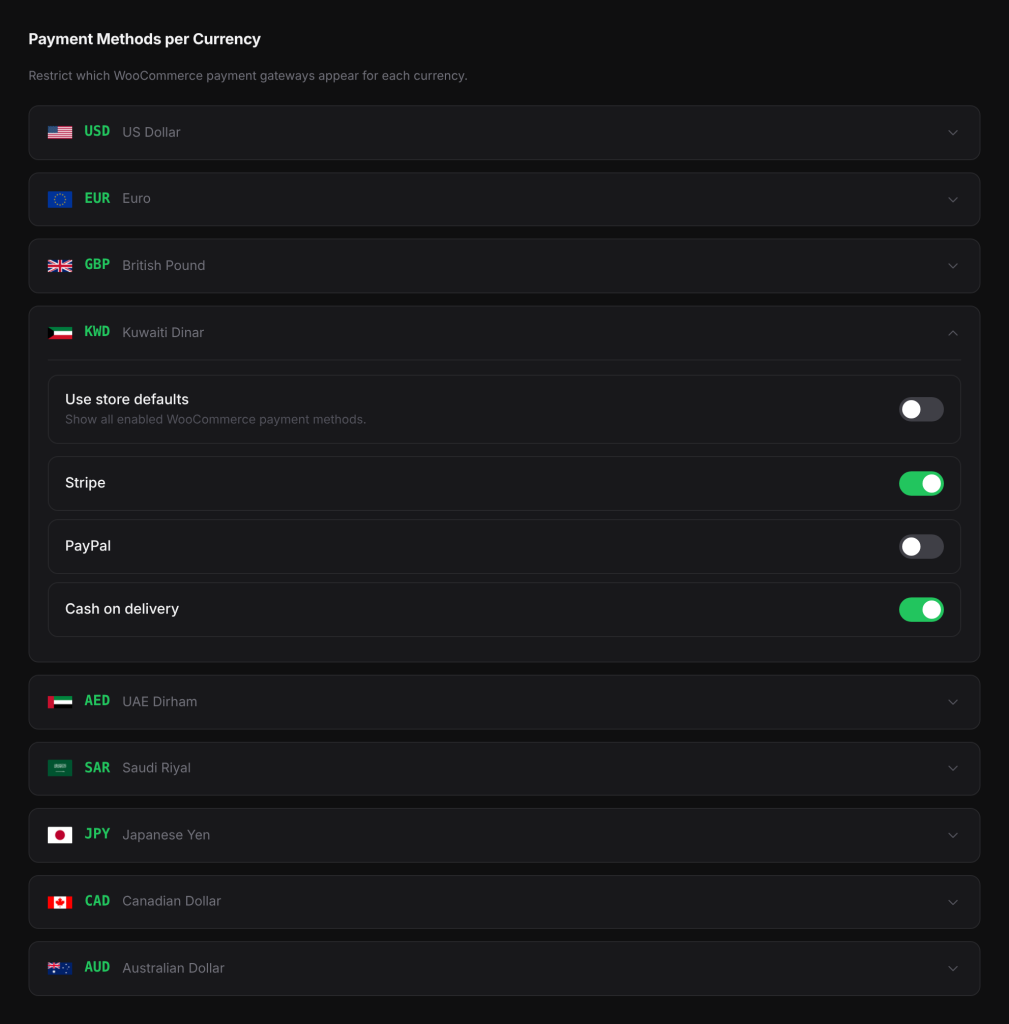
- Where: WooCommerce > Currency Switch > Payments. Click the currency to open its panel.
- What to do: if Use store defaults is on, every enabled WooCommerce payment method shows for that currency. If it is off, each method has its own switch: turn on the missing one and click Save Changes. A method added after you saved the panel is shown until you turn it off.
4. Check the provider accepts the currency#
- Check: whether the payment provider supports the currency, and whether your account with them has it enabled.
- Where: your payment provider’s dashboard and documentation.
- What to do:
- PayPal Payments: PayPal does not settle every currency. AED, KWD, SAR and QAR, for example, are not supported, and a PayPal button in those currencies fails. Turn PayPal off for those currencies on the Payments tab.
- Stripe: reads the checkout currency from WooCommerce. Make sure the currency is enabled on your Stripe account.
- MyFatoorah: the currencies you can take are set in your MyFatoorah account.
- Other methods: some hide themselves for currencies they do not support. Check the provider’s list.
5. Test as a shopper#
- Check: a real checkout in that currency.
- Where: a private browser window.
- What to do: switch to the currency, add a product to the cart and open the checkout. If you changed Change currency follow, also change the billing or shipping country and watch the payment list update.
Example#
Store currency USD. KWD panel: Use store defaults off, PayPal off, card payments on.
- A shopper in KWD sees card payments only.
- A shopper in USD sees every enabled method, because the USD panel uses store defaults.
- If you turn on Settle orders in base currency, the KWD shopper’s checkout runs in USD, so they also see every enabled method, PayPal included, and pay in USD.
Good to know#
- Express pay buttons on product pages (for example Apple Pay or Google Pay) charge the currency shown on that page, even with Settle orders in base currency on.
- With Lock currency at checkout on, the switcher is disabled on the cart, checkout and order pay pages, so the shopper cannot change currency there to reach another method.
Related docs#
- Payment methods per currency
- Stripe, PayPal and other payment gateways
- Checkout currency options
- Change currency by billing or shipping country