
How first-visit currency detection works
When someone visits your store for the first time, WC Currency Switch can show prices in their own currency straight away, without them touching the switcher. A shopper in Kuwait lands on your shop and sees prices in KWD. A shopper in Germany sees EUR. This is called first-visit detection: the plugin finds the visitor’s country, picks a currency for it and remembers the choice in a cookie (a small piece of text the browser stores for your site).
How it works#
Every time a page loads, the plugin decides which currency to show. It checks these in order and stops at the first one that gives an enabled currency:
- The currency cookie. A currency the visitor picked in the switcher, or one detected on an earlier visit. It always wins.
- A language rule, if you use Polylang or TranslatePress and have mapped the page’s language to a currency.
- Geo detection, when Auto-detect currency on first visit is on:
- your Location Rules for the visitor’s country, then
- the built-in country map (for example Kuwait to KWD, Germany to EUR, United Kingdom to GBP).
- The default currency, when the country is unknown, or its currency is not enabled.
Once geo detection has picked a currency, the plugin saves it in the cookie. From then on the cookie decides, so detection never runs again for that visitor until the cookie expires or is deleted.
With WPML and WooCommerce Multilingual active, WooCommerce Multilingual’s own currency is used instead. See WPML and WooCommerce Multilingual.
On cached pages#
If your pages are cached, the page HTML is the same for everyone, so the server cannot detect each visitor while building it. The plugin handles this with a small script in the page head. On a visitor’s first page view, when there is no cookie yet, the script asks your server for the visitor’s currency in the background (a request to admin-ajax.php with the action wccs_set_currency). It then saves the cookie and swaps the prices on the page without a reload. This request is only sent once per browser session, and is tried again on the next page if it fails.
Set it up#
- Go to WooCommerce > Currency Switch > General.
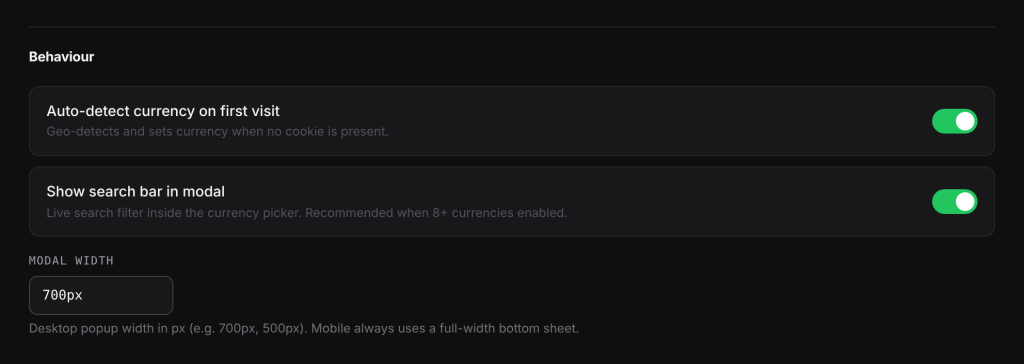
- Make sure Auto-detect currency on first visit is on. It is on by default.
- Check Cookie Name and Cookie Lifetime (days). The defaults work for most stores.
- Click Save Changes.
- Open the Geo Detection tab and choose how the country is found (see Geo detection sources and the CDN fallback).
- Make sure the currencies your visitors need are enabled on the Currencies tab. A country whose currency is not enabled gets the default currency.
Settings explained#
| Setting | Where | What it does | Default |
|---|---|---|---|
| Auto-detect currency on first visit | General | Detects the country and sets the currency when no cookie is present. When off, every new visitor starts in the default currency. | On |
| Cookie Name | General | The name of the cookie that stores the visitor’s currency. Letters, numbers, dashes and underscores only (it is saved in lowercase). | wccs_currency |
| Cookie Lifetime (days) | General | How long the browser keeps the cookie. The minimum is 1 day. | 30 |
| Default Currency | General | Your store currency, and the one shown when detection finds no match. | Your WooCommerce currency |
Examples#
A first visit from Kuwait. KWD is enabled and you have no Location Rules. The visitor has no cookie, so the plugin detects the country (KW), looks it up in the built-in map (KWD), sees KWD is enabled and shows KWD prices. The cookie wccs_currency is set to KWD for 30 days.
A Location Rule wins over the map. You added a rule Lebanon to USD. A visitor from Lebanon gets USD, even though the built-in map says LBP.
The visitor picks another currency. The Kuwait visitor opens the switcher and picks USD. The cookie now says USD, and they see USD on every later visit. Detection does not change it back.
A currency you do not sell in. A visitor from Japan arrives, but JPY is not enabled. They get your default currency.
Good to know#
- Detection only happens once per visitor. To test it again, use a private browser window or delete the cookie.
- If the cookie holds a currency you have since disabled, the cookie is ignored and the currency is worked out again.
- When a language rule sets the currency, geo detection is skipped and no cookie is written, so the language keeps deciding on each page.
- A visitor on a VPN or a company network may be detected in another country.
- The currency cookie is needed for the store to remember a choice. If you use a cookie consent banner, mark the cookie as essential. Must Have Cookie does this automatically.
Changing the Cookie Name makes every visitor’s saved choice disappear, because browsers still hold the old name. Set it once and leave it.
Related docs#
- Geo detection sources and the CDN fallback
- Location Rules: pick the currency for a country
- Setting the default currency
- Geo detection picks the wrong currency