
Reload vs Instant switchingBeta
Instant switching is in beta. Reload is the default and the recommended mode.
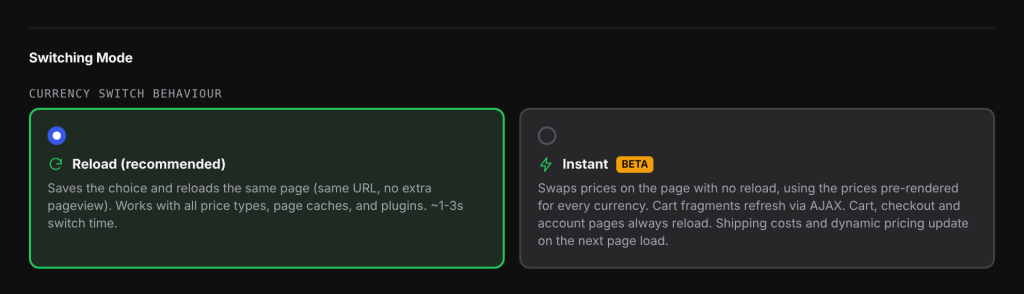
When a shopper picks a new currency, the plugin can either reload the page or change the prices right where the shopper is, with no reload. This setting chooses which. For example, a shopper browsing your shop page in USD picks EUR. In Reload mode the page reloads and comes back in euros. In Instant mode (beta) the prices change to euros on the spot and the page does not reload.
How it works#
In both modes the plugin first saves the shopper’s choice in the currency cookie (wccs_currency by default). After that:
- Reload reloads the same page. The address in the browser does not change, so your analytics does not count an extra page view. The page comes back fully worked out by your server in the new currency, so every amount on it is exact.
- Instant (beta) does not reload. Each price on your pages already carries a ready-made version in every enabled currency, worked out by your server. Instant mode simply shows the version for the chosen currency. Anything that only your server can work out, such as shipping, waits until the next page load.
Set it up#
- Go to WooCommerce > Currency Switch > General.
- Scroll to Switching Mode.
- Under Currency switch behaviour, choose Reload (recommended) or Instant (marked BETA).
- Click Save Changes.
Which mode to choose#
| Mode | What happens | Best for |
|---|---|---|
| Reload (default) | Saves the choice and reloads the same page. | Every store. Shipping, totals and dynamic pricing are always exact. Works with page caches and other plugins. |
| Instant (beta) | Swaps the prices on the page with no reload and refreshes the mini cart. | Catalogue pages where speed matters, on stores that do not depend on shipping or discount rules being shown before the next page. |
What Instant (beta) updates right away#
- Every product price on the page, including prices added later by load more buttons, infinite scroll, quick view or AJAX filters (filters that load results without a page reload).
- The price of the variation a shopper picks on a variable product.
- The classic mini cart and the block mini cart, which are fetched again in the new currency.
- Every switcher button and popup on the page, and the switcher in your menus.
[wccs_rate]lines that have notoattribute.[wccs_converter]widgets that have nofromattribute. They follow the new currency until the shopper picks a “from” currency in the converter.
Screen readers hear “Prices now shown in Euro (EUR).” when the switch is done.
What waits for the next page load#
- Shipping costs, free shipping notices and dynamic pricing or discount rules.
- Price filter sliders and their labels.
- Prices drawn in the browser by blocks that do not use WooCommerce price HTML, such as the All Products block.
These catch up as soon as the shopper opens another page or reloads.
Pages that always reload#
The cart, checkout and My Account pages always reload, even in Instant mode. Their totals are worked out by your server, so a reload keeps them exact.
The page also always reloads when WooCommerce Multilingual’s multi-currency feature is on, because the plugin must tell WooCommerce Multilingual about the change first.
Examples#
A store that shows a free shipping notice. The theme shows how much more the shopper must spend to get free shipping. With Reload, the notice is in the new currency straight after the switch. With Instant, it still shows the old currency until the next page. Reload is the better fit.
A large catalogue with infinite scroll. Shoppers flick between USD and EUR while browsing hundreds of products. Instant (beta) changes the prices without losing their scroll position, and new products that load in as they scroll appear in the chosen currency.
Good to know#
- If a shopper has your store open in two tabs and switches currency in one, the other tab catches up when they return to it (except on cart, checkout and account pages).
- Pages served from a page cache show the right currency in both modes, because the price shown is picked in the browser from the cookie.
- If Lock currency at checkout is on, the switcher cannot be used on the cart, checkout and pay pages in either mode.
- Developers can listen for the
wccs:currencybrowser event ondocument.detail.currencyholds the code now shown.
document.addEventListener( 'wccs:currency', function ( e ) {
    console.log( 'Prices now in', e.detail.currency );
} );
Related docs#
- Adding the currency switcher
- How WC Currency Switch works with page caching
- JavaScript API
- WPML and WooCommerce Multilingual