
Fixed prices for products and variations
A fixed price is an exact price you set for a product in one currency, instead of letting the plugin convert it. Use it when a price matters too much to leave to the exchange rate: a bestseller you always want at €49.00, a product priced to match a local competitor, or a round KWD price for your Kuwait shoppers. You can set fixed prices on simple products and on each variation of a variable product, with an optional sale price per currency.
How it works#
Normally a price in another currency is your store price × the exchange rate, plus any fee, then rounded. A fixed price skips all of that: the shopper is charged exactly the amount you typed. It is set per product and per currency, so one product can have a fixed EUR price while its GBP price is still converted automatically.
Fixed prices are only shown to shoppers using that currency. In the admin area and in your store currency, the product keeps its normal store-currency price.
Set it up#
Simple products#
- Go to Products and open a simple product.
- Scroll to the Currency Fixed Prices box. It has one row for each enabled currency, except your store currency.
- Type a price in Fixed regular price for each currency you want to fix. Leave a row empty to keep automatic conversion for that currency.
- Optionally type a Fixed sale price.
- Click Update (or Publish).
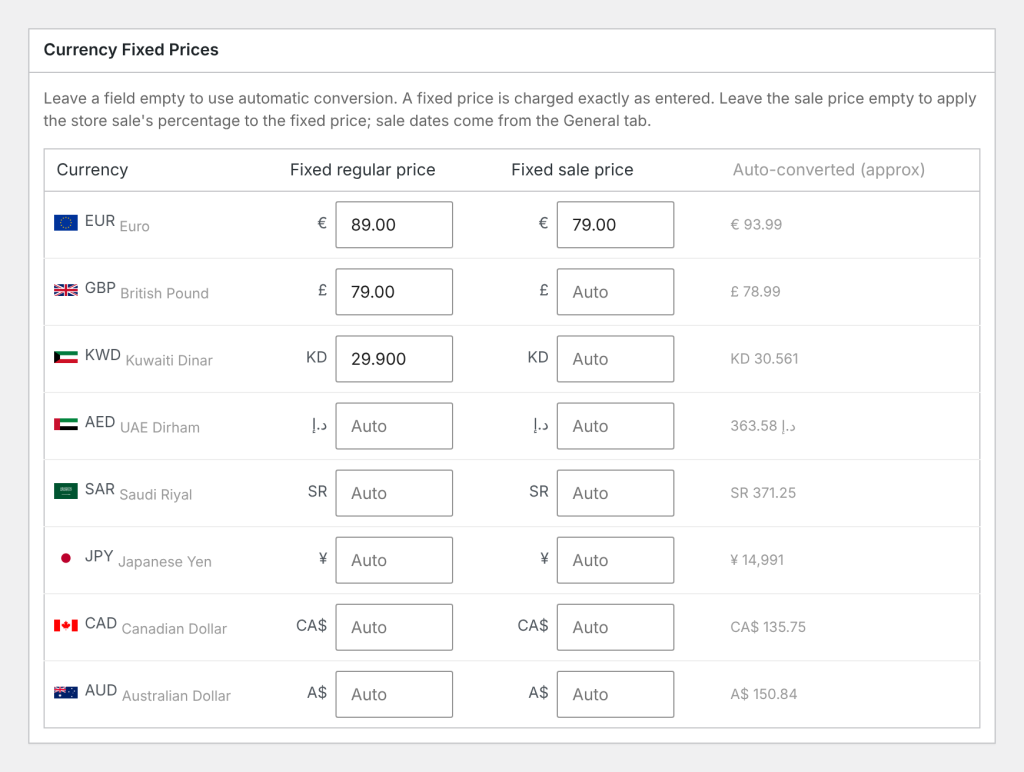
The Auto-converted (approx) column shows what the price would be without a fixed price, using your current rate, fee and rounding settings. It is there for reference and is based on the product’s saved regular price.
Variations#
For a variable product, the Currency Fixed Prices box only shows a note pointing you to the variations.
- Open the product and go to Product data > Variations.
- Expand a variation.
- In its pricing section, find Currency fixed prices. Each currency has a regular field and a sale field.
- Fill in the prices you want to fix. Empty fields use automatic conversion.
- Click Save changes under the variations, or Update for the product.
Each variation has its own fixed prices. The price range shown for the variable product is built from them.
Sale prices#
Fixed sale prices follow the product’s own sale schedule (the Schedule dates next to the sale price on the General tab, or on the variation). If the product has no schedule dates, the sale counts as always on.
| Product setup | Price shown in that currency |
|---|---|
| Fixed regular and fixed sale price | The fixed sale price, while the sale schedule allows it |
| Only a fixed regular price, and the store price is on sale | The same percentage off the fixed regular price as the store sale (a 20% store sale stays 20% off) |
| Fixed sale price, store price not on sale | The fixed sale price |
| Only a fixed regular price, store price not on sale | The fixed regular price |
Examples#
Your store currency is USD. A product costs $50.00, with a store sale price of $40.00 (20% off).
Fixed regular price only. You set Fixed regular price for EUR to 49. There is no fixed sale price, so the store sale’s percentage is used: 49.00 × (40.00 ÷ 50.00) = 49.00 × 0.80 = 39.20. The shopper sees €49.00 crossed out and €39.20.
Fixed regular and sale prices. You set EUR to 49 regular and 35 sale. The shopper sees €49.00 crossed out and €35.00.
Three decimals. You set KWD to 15.5 with no fixed sale price. 15.500 × 0.80 = 12.400. The sale price is worked out to KWD’s 3 decimal places, so the shopper sees KD15.500 crossed out and KD12.400.
Mixed. The same product has a fixed EUR price but no fixed GBP price. EUR shoppers see your fixed price. GBP shoppers see the converted store price, with the GBP fee and rounding applied.
Good to know#
- A fixed price ignores the exchange rate, the Conversion Fee % and rounding.
- A fixed sale price on its own does nothing. You need a Fixed regular price in that currency for the fixed sale price to be used.
- A fixed sale price that is the same as, or higher than, the fixed regular price is ignored.
- If you remove a currency from your enabled list, its fixed prices stay saved on your products. They are used again if you add the currency back.
- When your pages are cached, a product with fixed prices carries its complete price display for every currency, so a shopper who switches currency sees the right fixed price.
- The price filter searches your store-currency prices. A product with a fixed price is found by its converted store price, not by its fixed price.
Use the Auto-converted (approx) column as a starting point. If it shows €45.99, you might set a fixed €45.00 or €49.00 depending on your pricing plan.
Related docs#
- How converted prices are worked out
- Price rounding and conversion fees
- Fixed exchange rates
- Free shipping minimums, coupons and the price filter