
Change currency by billing or shipping country
Geo detection guesses a shopper’s currency from where they are browsing. But a shopper in an airport in Dubai may live in France, and want to pay in EUR. Change currency follow lets the address the shopper types at checkout decide instead: when they pick their billing or shipping country, the currency changes to match it. A shopper who picks France as their billing country switches to EUR, and one who picks Kuwait switches to KWD.
How it works#
When the shopper changes the country field on the checkout page, WooCommerce updates the order summary. At that moment the plugin:
- Reads the country you chose to follow (billing or shipping).
- Finds the currency for that country: your Location Rules first, then the built-in country map.
- If that currency is enabled and different from the current one, switches the shopper to it. The order summary, shipping and payment methods are then shown in the new currency.
The switch is saved in the shopper’s currency cookie, so they keep the new currency on the rest of your store too.
If the country’s currency is not enabled, or is already the current currency, nothing changes.
This works on the classic checkout only, not the block checkout. It is also not used while Settle orders in base currency is on, because the checkout is then always in your store currency.
Set it up#
- Go to WooCommerce > Currency Switch > General.
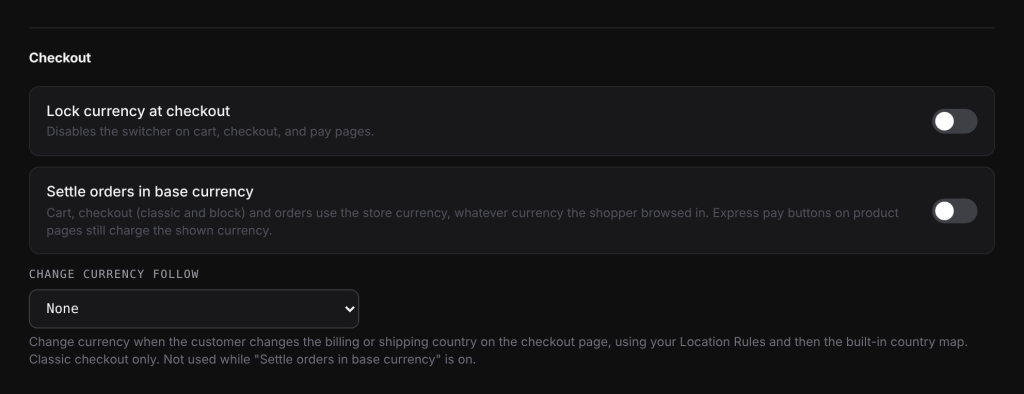
- In the Checkout section, pick an option under Change currency follow: Billing address or Shipping address.
- Two more options appear. Set them as you need (see below).
- Click Save Changes.
- Make sure the currencies you expect are enabled, and add Location Rules for any country whose usual currency you do not sell in.
Settings explained#
| Setting | What it does | Default |
|---|---|---|
| Change currency follow | None: the currency does not change at checkout. Billing address: the billing country decides. Shipping address: the shipping country decides. | None |
| Only get shipping address | Only change currency when the shopper changes the shipping country field. If off and the shopper has not ticked “Ship to a different address”, the billing country is used. | Off |
| Sync checkout currency | Reloads the checkout after the currency changes, so the header switcher and mini cart show the new currency too. | Off |
Which country is used with Shipping address#
| “Ship to a different address” | Only get shipping address off | Only get shipping address on |
|---|---|---|
| Ticked | Shipping country | Shipping country |
| Not ticked | Billing country | Shipping country field |
If your store only ships to the billing address, the billing country is used.
Examples#
Billing address. Your store currency is USD and you have EUR and KWD enabled. A shopper browsing in USD picks France as their billing country. The currency for France is EUR, which is enabled, so the checkout switches to EUR. They then change their mind and pick Kuwait: the checkout switches to KWD.
Country without an enabled currency. The same shopper picks Japan. JPY is not enabled and you have no Location Rule for Japan, so the currency stays as it is.
With a Location Rule. You have the rule Switzerland to EUR. A shopper who picks Switzerland switches to EUR, not CHF.
Good to know#
- PayPal Payments always reloads. When PayPal Payments is enabled and offered in the new currency, the checkout always reloads after the switch, even with Sync checkout currency off. Its buttons are set up for one currency at a time.
- Payment methods refresh. Without a reload, if the new currency has different payment methods on the Payments tab, the payment section of the checkout is refreshed.
- The address is kept. After a reload, the shipping country and the “Ship to a different address” choice stay as the shopper set them.
- Lock currency at checkout only disables the switcher button. The checkout country can still change the currency.
Turn on Sync checkout currency if your header shows a currency switcher or mini cart on the checkout page. Without the reload, those parts of the page keep showing the old currency until the next page load.
Related docs#
- Location Rules: pick the currency for a country
- Checkout currency options
- Payment methods per currency
- Stripe, PayPal and other payment gateways