
Geo detection sources and the CDN fallback
To show a first-time visitor their own currency, WC Currency Switch first needs to know which country they are in. The Geo Detection tab is where you choose how that country is found. For example, if your site runs behind Cloudflare or Bunny CDN, the country is already in every request and costs nothing to read. If it does not, you can look the visitor’s IP address up in WooCommerce’s own database or with an online service.
A CDN (content delivery network) serves cached copies of your pages from servers near your visitors. Most CDNs also tell your site which country each visitor is in, by adding a header (a small labelled value) to the request.
How it works#
You pick one Detection source. Detection only runs once per visitor: after that the currency cookie is used (see How first-visit currency detection works).
When the source is CDN header, you can also pick a Fallback when there is no CDN header. The fallback is used when a request reaches your server without a country header, for example when a page is served from your own server (the origin) instead of the CDN.
If no country can be found, the visitor gets the default currency.
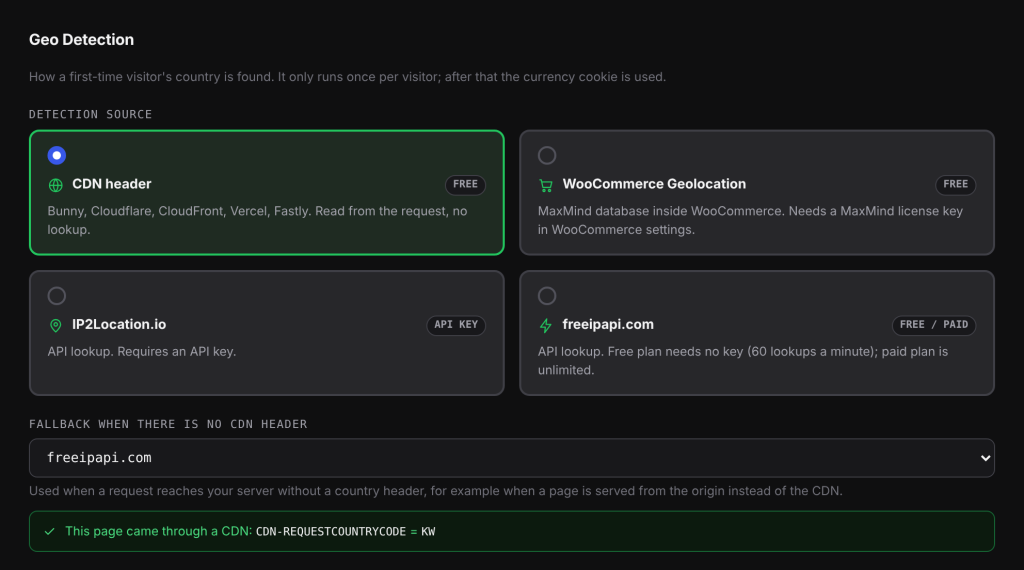
The four sources#
| Source | Cost | How it works |
|---|---|---|
| CDN header (default) | Free | Reads the country header your CDN adds to each request: Bunny, Cloudflare, CloudFront, Vercel, Fastly and similar. No lookup and no delay. |
| WooCommerce Geolocation | Free | Uses the MaxMind database inside WooCommerce. Needs a MaxMind license key under WooCommerce > Settings > Integration. |
| IP2Location.io | API key | Looks up the visitor’s IP address with the IP2Location.io service. Paste your key in API key. Without a key, nothing is detected. |
| freeipapi.com | Free or paid | Looks up the IP address with freeipapi.com. The free plan needs no key and allows 60 lookups a minute. The paid plan has no such limit. |
The CDN headers it reads#
With CDN header, the plugin checks these headers in this order and uses the first one that holds a valid two-letter country code:
| Header | Sent by |
|---|---|
CDN-RequestCountryCode |
Bunny CDN |
X-Bunny-Country, X-BunnyCDN-Country |
Bunny CDN, when set by a custom edge rule |
CF-IPCountry |
Cloudflare |
CloudFront-Viewer-Country |
Amazon CloudFront |
X-Vercel-IP-Country |
Vercel |
Fastly-Geo-Country-Code |
Fastly, when you set it in your configuration |
X-Country-Code, X-Real-Country, X-Geo-Country |
Generic headers for custom edge rules |
The values XX (unknown country) and T1 (the Tor network) are ignored, so the next header or the fallback is used instead.
On Cloudflare, the country header needs IP Geolocation turned on in the Network settings.
Set it up#
- Go to WooCommerce > Currency Switch > Geo Detection.
- Under Detection source, pick a source.
- If you picked CDN header, choose a Fallback when there is no CDN header: None (use the default currency), WooCommerce Geolocation, IP2Location.io or freeipapi.com.
- If you picked IP2Location.io (as source or fallback), enter your API key in the IP2Location.io box.
- If you picked freeipapi.com, choose a Plan: Free (no key) or Paid. For the paid plan, enter your API key and pick the Server closest to your web server: Germany, United States, Singapore or Australia. You can leave the key empty if your server’s IP address is whitelisted in your freeipapi account.
- Click Save Changes.
Check that your CDN sends the header#
With CDN header selected, the tab shows what it received on that page load, for example CF-IPCOUNTRY = KW. If it says there is no CDN country header, that is normal when admin pages bypass your CDN. Check that a storefront page goes through the CDN instead.
Settings explained#
| Setting | What it does | Default |
|---|---|---|
| Detection source | Where the country comes from. | CDN header |
| Fallback when there is no CDN header | The lookup used when no CDN header arrives. Only shown for CDN header. | WooCommerce Geolocation |
| API key (IP2Location.io) | Your IP2Location.io key. | Empty |
| Plan (freeipapi.com) | Free (no key) or Paid. | Free (no key) |
| API key (freeipapi.com, paid) | Your freeipapi key. | Empty |
| Server (freeipapi.com, paid) | Which freeipapi server to ask. | Germany |
Lookups, caching and limits#
- One lookup per visitor. A successful IP lookup is cached for each IP address for one hour, so a visitor who browses several pages before the cookie is saved does not cost a second lookup. Failed lookups are not cached, so they are tried again next time.
- Short wait. An online lookup (IP2Location.io or freeipapi.com) waits at most 3 seconds for an answer. If none comes, the visitor gets the default currency.
- freeipapi.com free plan. The 60 lookups a minute are shared by all your visitors, because the lookups come from your server, not from each visitor’s browser. If freeipapi says the limit is reached, detection with freeipapi pauses for one minute and new visitors in that minute get the default currency.
- The visitor’s IP address. For IP2Location.io and freeipapi.com, the plugin reads the visitor’s real IP from the headers set by Bunny or Cloudflare, then
X-Real-IP, then the first address inX-Forwarded-For, and finally the connection address.
Examples#
Store on Bunny CDN. Keep CDN header with the default fallback WooCommerce Geolocation. A visitor from Kuwait arrives through Bunny with CDN-RequestCountryCode: KW, so KWD is picked with no lookup. A request that reaches your server directly, without the header, is looked up in WooCommerce’s MaxMind database instead.
Store with no CDN and a lot of traffic. Pick IP2Location.io or the paid freeipapi.com plan. The free freeipapi plan is fine for small stores, but on a busy day, once more than 60 new visitors arrive in one minute, the extra visitors get the default currency until the pause ends.
Good to know#
- Detection only runs for visitors with no currency cookie. Test changes in a private browser window.
- A visitor on a VPN or company network may appear to be in another country.
- WooCommerce Geolocation only works once a MaxMind license key is set in WooCommerce.
Related docs#
- How first-visit currency detection works
- Location Rules: pick the currency for a country
- Bunny CDN and Cloudflare
- Geo detection picks the wrong currency