
The currency cookie and price data
WC Currency Switch remembers each visitor’s currency in a browser cookie, and prints every price on the page in every enabled currency so cached pages can show the right one. This page describes both, plus the headers the plugin sends, for developers building a custom integration, a CDN rule or a cache setup. For example, a CDN (content delivery network, which serves cached copies of your pages from servers near your visitors) can be told to treat visitors with the wccs_currency cookie differently.
The currency cookie#
| Property | Value |
|---|---|
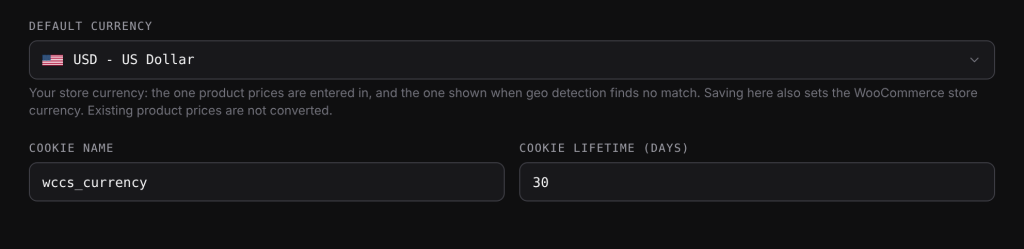
| Name | wccs_currency by default. Change it under WooCommerce > Currency Switch > General > Cookie Name. |
| Value | A 3-letter currency code in capitals, for example KWD. |
| Lifetime | 30 days by default. Change it under Cookie Lifetime (days) (minimum 1). |
| Path | / (the whole site) |
| Domain | Not set, so the cookie belongs to the exact host name. |
| Readable by JavaScript | Yes. It is not HttpOnly. |
When PHP writes the cookie, it also sets SameSite=Lax, and Secure on HTTPS sites. When the browser writes it (the switcher, the nav menu, geo detection after a background lookup), only the path and expiry are set.
Who writes it#
- PHP: a
?wccs_cur=CODElink,wccs_switch_currency(), geo detection on a first visit that PHP renders, and Change currency follow at checkout. - The browser: the switcher popup, the nav menu switcher, and geo detection when the page came from a cache.
How it is read#
On every front-end request, PHP uses the cookie if its value is an enabled currency. Anything else is ignored and the plugin falls back to a language rule, geo detection or the default currency. In the browser, the script also ignores values that are not a 3-letter code. In the WordPress admin, the cookie is ignored and the store currency is always used.
Price data in the page#
Every price printed by WooCommerce’s wc_price() on a normal front-end page is wrapped like this:
<span class="wccs-price">
  <span class="woocommerce-Price-amount amount">...visible price...</span>
  <span class="wccs-all" data-wccs-prices='{"USD":"...","EUR":"...","KWD":"..."}' style="display:none"></span>
</span>
data-wccs-prices holds the full price HTML for each enabled currency, keyed by code, worked out with the same rate, fee and rounding as a normal page load. The script reads the cookie and swaps the visible price for the matching entry. The hidden store stays in place, so the price can be swapped again.
- Fixed product prices: a product with fixed prices gets
class="wccs-price wccs-price-fixed", and each entry holds the product’s whole price HTML (regular, sale and ranges) for that currency. - Exchange rate text:
[wccs_rate]without atoattribute prints<span class="wccs-rate" data-wccs-rates="...">with one line per enabled currency. - Not wrapped: cart, checkout and account pages, emails, feeds, AJAX and REST responses, and any
wc_price()call made for a currency other than the page’s currency. Prices are also not wrapped when only one currency is enabled, or for fixed-price products when WPML with WooCommerce Multilingual is active.
The page config#
Front-end pages also carry a small config object in the footer, window.wccsInstant:
{ "active": "KWD", "cookie": "wccs_currency", "days": 30, "mode": "reload", "wc_page": false }mode is reload or instant. wc_page is true on cart, checkout and account pages, where switching always reloads.
Response headers#
Every front-end response that WordPress builds sends these two headers. A page served straight from a cache was not built by WordPress for that request, so treat its headers as the ones from when it was cached.
Vary: Cookie, which tells caches that the response depends on cookies.X-WCCS-Currency, with the cookie value WordPress received, ordefaultwhen there was none.
Examples#
Check that a request carrying the cookie reaches WordPress, from your terminal:
curl -sI -H "Cookie: wccs_currency=EUR" https://example.com/shop/ | grep -i x-wccsThe answer X-WCCS-Currency: EUR means WordPress built the response with that cookie. Any other value means the response came from a cache or the cookie was dropped on the way.
Read the visitor’s currency in your own script without depending on the switcher:
var match = document.cookie.match(/(?:^|;)\s*wccs_currency=([^;]*)/);
var code = match ? decodeURIComponent(match[1]).toUpperCase() : '';
If you changed the cookie name, use window.wccsInstant.cookie instead of a fixed name. In PHP, call wccs_active_currency() rather than reading the cookie, because it also covers language rules, geo detection and the default currency.
Related docs#
- How WC Currency Switch works with page caching
- Cookie consent banners
- JavaScript API
- Developer overview and PHP functions